
Blog
News, announcements, and insights from the Ultravox team

Voice AI Trends for 2026
From simple, flow-based agents that help manage appointment booking and rescheduling, to more complex deployments that converse naturally with users, voice AI has applications across a wide variety of industries and use cases. The voice AI market is expected to exceed $22 billion in 2026, and Gartner forecasts that by 2029, agentic AI will autonomously resolve up to 80% of customer service issues without human intervention.
Adoption has been driven by improvements to model intelligence, as well as new capabilities unlocked by the adoption of speech-native models, rather than merely the urge to cut costs. At AI-native startups and established organizations alike, teams are building entirely new projects around voice agent capabilities, creating applications that were not previously practical nor scalable with human agents.
For developers building on or alongside these systems, the question is no longer whether voice AI is commercially viable — it's which architectural and capability decisions are worth prioritizing now.
Here is a grounded look at the trends shaping the space.
1. Emotional AI: Sentiment and Tone Detection
Most human speech carries emotional signals that a text transcript alone cannot capture — hesitation before giving a credit card number, frustration in a billing dispute, or urgency when a shipment has gone missing. Voice agents that respond to paralinguistic signals such as tone and cadence can better match (or balance) a user's heightened emotional state, delivering not just a better conversational experience, but a more positive resolution.
Traditional component pipeline architecture relies on transcribing a user's speech, allowing an LLM to reason on the resulting text. Thanks to modern ASR models, transcriptions are usually fairly accurate. But while transcription might perfectly capture the words spoken, it can't preserve the full richness of paralinguistic signals that heavily influence meaning.
For use cases that require a more natural conversational experience, teams are turning to speech-native voice AI systems. Unlike the component pipeline, speech-native models don't rely on transcription — instead, they perform reasoning directly on incoming audio. Among other benefits, this approach allows the model to reason on the full context of spoken audio, including non-transcribable paralinguistic signals. Voice agents are now being trained to detect those signals and respond to them appropriately, adapting to an individual user's apparent emotional state.
With speech-native models and modern training techniques, AI researchers are working to develop models with what the team at Sesame calls "voice presence," a qualitative description of spoken interactions that feel genuine and conversational.
2. Proactive Agents
Most voice agent interactions today follow the same basic pattern: a user initiates contact, the agent responds. That reactive model works well for inbound support or customer requests, but it leaves value on the table. In some use cases, the agent will have access to relevant information (via integrated systems) that the user hasn't yet thought to ask for.
For example, an avid shopper calling with questions regarding a return may not think to ask about a separate, more recent order that has just been flagged as delayed (and in fact, the customer may not yet be aware that their order is delayed). But a proactive agent with access to their order history can surface that information in the same interaction. Whether the brand in this scenario wishes to offer a discount or credit in apology or simply to inform the customer of the delay, the agent interaction will undoubtedly feel more personalized and more informative than the customer might've expected.
Proactive voice agents may also initiate contact or surface information based on event-driven triggers, such as a service outage, an annual check-up, or a shipment delay, without waiting for the user to call first. Production examples are already in deployment: agents that reach out when service degradation is detected in a user's area, or follow up with a patient after an appointment based on context from their recent visit.
Architecturally, this approach shifts the design pattern from a transactional request-response to a model that is primarily event-driven. The agent needs a way to connect to relevant data streams from scheduling systems, backend monitoring, or a CRM, as well as logic to evaluate when it's appropriate to initiate contact.
Rate limiting and user preference controls matter as much as the AI itself in these circumstances. An agent that reaches out daily in a well-intentioned attempt to book a dental cleaning is not likely to engender positive feelings on the part of the patient. Outreach that is too frequent or too aggressive is likely to erode the very trust that makes proactive contact valuable in the first place.
3. Real-Time Multilingual Translation
Language support has historically been treated as a localization problem: build an agent in one language, then commission translations for each additional market. That approach doesn't scale well, and it tends to produce uneven experiences — the primary language gets the most refinement, while languages added later often lag behind.
Modern voice agents are increasingly capable of detecting a caller's language mid-conversation and responding natively, including handling regional accents and mid-call language switches. Intent models are becoming language-agnostic, meaning a single trained workflow can serve speakers of different languages without duplicating business logic across separate deployments.
The core architectural question is whether to use a unified multilingual model or a language-detection and routing architecture. Unified models tend to win on latency and consistency; routing still has advantages where regional compliance requirements mandate separate data pipelines or where per-locale quality targets need to be tracked independently. In either case, for teams building for global audiences, designing for multilingual support from the start — rather than retrofitting it — tends to produce cleaner implementations.
4. Agentic Automation
Early voice agent deployments, while innovative, were largely transactional: the agent could answer questions, collect information, and route calls, but the actual work still happened downstream, handled by a human or a separate system. This was in part due to the novelty of the technology, but early voice agents relied on less-intelligent models than their more recent counterparts, so teams reasonably chose to restrict the tasks they'd allow a voice agent to do.
Agentic voice agents close that gap by executing multi-step tasks autonomously within the conversation itself; often processing a refund, updating an account record, booking an appointment, or triaging a support ticket without requiring a handoff.
This capability depends on the agent having well-defined access to external systems: APIs, databases, calendars, and other tools the agent can interact with in order to resolve a request. The orchestration layer needs to handle multi-step planning, failure recovery, and scope constraints — not just the happy path. Gartner projects that up to 40% of enterprise applications will embed task-specific agents by the end of 2026, up from less than 5% in 2025.
Audit trails and approval layers are not optional for anything touching sensitive operations. An agent with write access to a billing system can process a legitimate refund; it can also process an incorrect one. Documenting and designing the failure modes and oversight mechanisms before launch, rather than after the first production incident, is where most of the real engineering work lives.
See also: How 11x Outsourced Voice AI Innovation to Dominate their Market
5. Multimodal AI: Voice and Visual Channels
Voice is often the starting point of an interaction, but not always the right medium for its resolution. A caller asking about a contract clause, a billing breakdown, or a product comparison may be better served by a visual display than a verbal explanation. Increasingly, users expect the agent to make that transition from one medium to the next smoothly, rather than treating voice and screen as entirely separate experiences.
Leading platforms are beginning to treat voice as an orchestration layer that coordinates across telephony, messaging, and visual interfaces, rather than a standalone channel that loses context when a user switches surfaces. The practical challenge is context continuity: ensuring that session state, intent, and conversation history transfer cleanly when the interaction moves from audio to a screen-based interface.
Designing the cross-channel handoff before designing the voice experience may help produce cleaner implementations. Shared session tokens and unified state stores, rather than channel-specific ones, are the patterns most likely to hold up in production.
6. On-Device and Edge Architectures
Cloud-centric voice pipelines carry an inherent latency cost: audio travels to a remote model, inference runs, a response returns. For interactions that need to feel natural, that round trip is a meaningful constraint — and at scale, it's a financial one too.
The architectural response is a hybrid model: lightweight models handle acoustic perception and immediate intent classification on-device, while cloud inference takes over for complex reasoning and long-context tasks. In well-implemented hybrid systems, the majority of routine interactions can be resolved locally with near-zero latency, with the cloud reserved for requests that genuinely require it.
For teams targeting embedded or mobile deployments, the practical work involves designing the pipeline so that the boundary between local and cloud processing is explicit and deliberate — not an afterthought. Privacy is a secondary benefit that carries real weight in regulated industries: audio that never leaves the device is a meaningfully easier position to defend in a compliance conversation than one that relies on contractual data handling assurances from a third-party cloud provider.
Where This Leaves Developers
These trends are not isolated from one another. The most capable voice agents in production today combine emotional awareness, multilingual support, proactive and agentic behaviors, cross-channel continuity, and low latency within a single architecture. Building one component well is a reasonable starting point; building them to work together is where most of the challenging engineering work actually lives.
With the broader AI boom well underway, it's easy to forget that voice AI has only been a commercially viable solution for a few short years. But it helps explain why the gap between what is architecturally possible and what most teams have shipped remains significant.
The organizations and teams closing that gap between possibility and reality are not necessarily the ones with the largest models or the most unfettered access to GPUs. Instead, they are the ones that have made deliberate decisions at the integration layer, and designed for the failure cases before launch.
What we need to make voice AI fully agentic
There’s been an explosion of Voice AI “agents” over the past couple of years, but the truth is that there is very little agentic about them. Most Voice AI agents that are deployed today are closer to classic IVR-style systems of the past than agentic systems of 2026 (though, admittedly, with much better TTS).
So, even though agentic use cases are well on their way to dominating the world of text models–think of Claude Code’s meteoric rise–many production voice-based systems remain stuck in late 2024.
There are two related reasons that explain this status quo.
Model intelligence gains often come at the cost of increased reasoning time
The most popular models used for production voice agents today include GPT-4o (released in May of 2024), GPT-4.1, and Gemini 2.5 Flash (both released in April 2025), all of which reflect training techniques from more than 18 months ago. A year and a half might not sound like much in real terms, but it’s several generations behind the current state-of-the-art.
However, as models have gotten smarter, inference times have increased–for today’s frontier models, inference times can be in excess of several seconds. In a text-driven chat interaction, this less-than-instantaneous response time is unremarkable. But for voice agents, this increase in latency creates interactions that feel awkward, robotic, and stilted.
For voice agents powered by a component stack, ASR and TTS both contribute their own latency to the end-to-end reasoning pipeline. Older, legacy models perform considerably worse on reasoning, tool calling, and instruction following compared to the latest generation, but they offer one compelling advantage: faster reasoning. So by using an older model, teams stretch the overall latency budget further, albeit at the cost of model intelligence.
We lack a great harness for real-time interactions
The second problem is that we lack good harnesses for voice AI. In order to have a functional agentic system, you need a harness–a set of specialized primitives that wrap around the underlying model to handle details other than inference, such as memory usage or tool calling.
Having sacrificed model intelligence in order to keep latency under control, most voice agents need some alternative means of ensuring desired behaviors. Less-intelligent models often struggle to cope with ambiguity, so many approaches rely on a set of deterministic rules (usually defined in a node builder or similar system) to govern the conversation.
Deterministic guidance can help bridge the gap, improving instruction following behavior and generally keeping the model on track over the course of a conversation. But restricting the agent’s behavior to a narrow set of paths in this way often produces extremely unnatural conversational dynamics, and (ironically) can actually contribute to end-to-end latency.
Compare this node-based approach with modern agentic harnesses, which assume ambiguity and design systems around how to elegantly handle that. What’s unique about the voice AI space is the demand for speed; agentic voice experiences don’t just need smart models and great harnesses–they need a system that works in real-time, sounds natural, and doesn’t have to wait on thinking tokens before responding.
The Foundations of Agentic Voice AI
So what do natural, agentic voice systems look like? They have three properties:
First, they’re fast. Speed is non-negotiable in agentic voice systems. If you’re not consistently under ~1s of end-to-end latency, you’re already too slow. If your agent is built using a component stack, your text LLM needs to consistently deliver a TTFT (time to first token) at or below ~500ms, to allow for the additional latency cost of ASR and TTS. Speech-to-speech systems, rather than component pipelines, are generally the best path to achieving the necessary speed. Ultravox, for example, is a speech-native system with an end-to-end latency of ~900ms.
Secondly, they’re fluid. Agentic voice systems need to seamlessly call tools and manage the conversation state throughout a multi-turn interaction, without affecting speed or naturalness. Fluidity also means handling the ambiguity that arises in natural human communication–when the human speaker goes “off-script”, the agent needs to be able to adapt on the fly. This requires models that are exceptional at instruction following and tool calling, but also intelligent enough to respond gracefully to situations not explicitly described in the prompt. And realistically, if you’re not using 2026 models, you’re not going to get there.
And finally, agentic voice experiences need to be fluent. Users shouldn’t feel like they’re talking to a multi-faceted agentic system. Behind the scenes, there may be multiple models, threads, and other complex patterns making sense of the conversation state, but conversing with the model should feel as natural as talking to another human.
At Ultravox, we’ve designed our system from the beginning around these principles–fast, fluid, fluent. We have the fastest, smartest model available today for speech, and we’re designing the most effective harness for managing complicated, long-running agentic voice conversations. Over the next few months, we’ll be releasing a series of articles on the design patterns, primitives, and system architecture that we believe will empower teams to design and build truly agentic voice AI systems.
Let’s take Voice AI into 2026.
Why speech-to-speech is the future for AI voice agents: Unpacking the AIEWF Eval
Speech-to-speech is the future of voice AI–and as shown in the newly-released AIEWF eval, Ultravox’s speech-native model can outperform both frontier speech models and text models alike.
One of the ways we regularly test the intelligence of voice AI models is with standardized benchmarks, which test the model’s ability to perform tasks like transcribing audio, solve logic puzzles, or otherwise demonstrate reasoning based on spoken prompts.
But modern voice agents need to do more than just understand speech–they need to reliably follow instructions, participate in extended multi-turn conversations, perform function calls, and reference information from a knowledge base or RAG in responses.
Kwindla Kramer and the team at Daily have taken a new approach to creating a model evaluation framework that tests the capabilities that matter for production voice agents, beyond basic speech understanding. The AIEWF eval considers many of the practical requirements not tested in traditional speech understanding benchmarks–knowledge base use, tool calling, instruction following, and performance across a multi-turn conversation.
Traditional speech understanding evals like Big Bench Audio help us understand how accurately a model understands speech. The new AIEWF eval measures how well a model can reason in speech mode and complete tasks that real-world voice agents need to do.
Taken together, these evals demonstrate why speech-to-speech architectures are poised to overtake the component model for voice AI use cases.
Big Bench Audio: Evaluating speech understanding
Big Bench Audio is a widely-used evaluation framework that tests a model’s speech understanding, logical reasoning, and ability to process complex audio inputs accurately across multiple modes, including speech-to-speech and speech-to-text output. It’s a useful framework for quantifying a model’s inference capabilities given complex audio input.
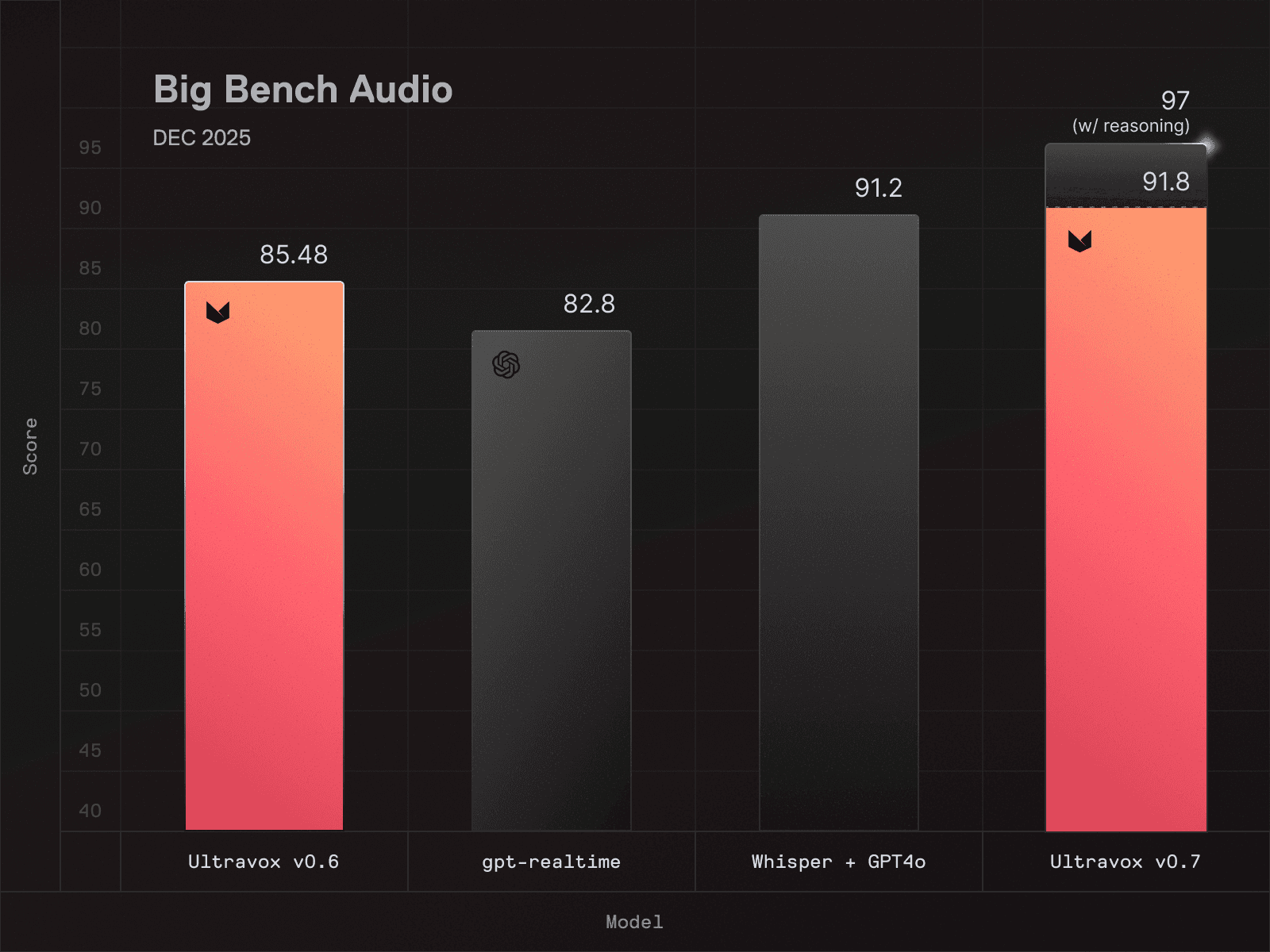
High scores indicate a model that effectively understands spoken language, which requires deep investment in architecture, training, and engineering (For the record, Ultravox v0.7 scores a 91.8 on Big Bench Audio–the highest score of any speech model available at time of writing.)
Naturally our team is excited about our achievement, but we think it’s worth being transparent about the limitations of the test itself.
Big Bench Audio measures model capability in a narrow, relatively isolated context. Here’s an example question from the Big Bench Audio eval for speech-to-speech models (transcribed from original audio sample):
Question: Osvaldo lies. Phoebe says Osvaldo lies. Candy says Phoebe tells the truth. Krista says Candy tells the truth. Delbert says Krista lies. Does Delbert tell the truth? Answer the question.
A model that can correctly answer this question (Delbert does not tell the truth) demonstrates its ability to understand spoken audio as well as its ability to reason logically about speech, both of which are relevant if you’re building a voice agent.
However, Big Bench Audio alone doesn’t tell you much about how well a model handles messy, real-time, multi-step workflows that voice agents typically face in the real world. There’s no tool calling, no complex instruction following, no background noise or interruptions. The eval is structured as a series of questions and answers that are evaluated independently, rather than as a multi-turn conversation.
In order to more accurately understand how well a speech model will perform in the real world, a test needs to measure how the model handles real-world demands. This is where things get interesting.
The AIEWF eval goes beyond speech understanding, and considers performance across:
Tool usage: Can the model correctly invoke external functions and APIs?
Knowledge base integration: Can it retrieve and synthesize information from connected data sources?
Multi-turn conversations: Can it maintain context and coherence across extended interactions?
Task completion: Can it actually accomplish what users ask it to do?
These factors reflect many of the exact workflows that developers are building when they create voice agents for customer service, scheduling, information retrieval, and countless other applications. Instead of single-turn questions and answers, this framework tests reasoning across a set of 30-turn conversations, evaluating performance in individual conversations as well as the model’s consistency from one conversation to the next.
Metric | Ultravox v0.7 | GPT Realtime | Gemini Live |
|---|---|---|---|
Overall accuracy | 97.7% | 86.7% | 86.0% |
Tool use success (out of 300) | 293 | 271 | 258 |
Instruction following (out of 300) | 294 | 260 | 261 |
Knowledge grounding (out of 300) | 298 | 300 | 293 |
Turn reliability (out of 300) | 300 | 296 | 278 |
Median response latency | 0.864s | 1.536s | 2.624s |
Max response latency | 1.888s | 4.672s | 30s |
When measured using the AIEWF multi-turn eval, Ultravox dominated the rankings for speech-to-speech models–in fact, it wasn’t even close.
While a few frontier language models were able to outperform Ultravox on these practical benchmarks, it was with a pretty significant caveat: those models are far too slow for real-time voice applications. When it comes to voice agents, low latency is table stakes, not just a nice-to-have; a 2-second pause while waiting for the model to “think” about its answer can undermine the entire conversational experience.
In short, Ultravox delivered frontier-adjacent intelligence at speeds suitable for real-time voice, delivering an overall experience that many developers might not have realized was possible.
Why speech-to-speech beats component stacks
For years, the standard approach to voice AI was building a component stack: a speech-to-text model feeds a language model, which feeds a text-to-speech model. Each component is built and optimized separately before being assembled into a pipeline.
This approach works(ish) for deterministic use cases, but it has fundamental limitations:
Latency accumulates: Every component in the pipeline adds processing time. By the time you've transcribed, reasoned, and synthesized, you've burned through your latency budget.
Errors compound: Transcription mistakes become reasoning mistakes, reasoning mistakes become response mistakes. There's no graceful recovery.
Context gets lost: The prosody, emotion, and nuance in speech disappear the moment you convert to text. The language model never sees them.
Ultravox’s speech-to-speech architecture sidesteps all of these issues, because incoming audio never goes through an initial transcription step; instead, the model performs reasoning directly on the original speech signal. The result is lower latency, fewer errors, and responses that actually reflect what the user said—not just the words, but the meaning.
The Bottom Line
Traditional benchmarks are a useful signal of a model's fundamental ability to understand speech. But if you're building voice agents, it’s important to bear in mind that traditional benchmarks only tell part of the story.
If you're building voice agents, you need a model that excels at both: strong foundational capabilities *and* practical task performance. Ultravox delivers on both fronts. Highest scores on Big Bench Audio. Top speech model on real-world voice agent tasks. Fast enough for production use.
If you're evaluating models for your next voice agent project, the choice is clear. Ultravox isn't just competitive—it's the best all-around solution available today.
Ready to build with Ultravox? Get started here or contact our team to discuss your voice agent project.
Inworld TTS 1.5 Voices Are Now Available in Ultravox Realtime
There’s no such thing as “one-size-fits-all” when it comes to voice agents. Accent, tone, and expressiveness can make or break the end user experience, but the “right” choice depends entirely on the product you’re building. That’s why we’re excited to announce that Ultravox Realtime now allows users to build natural, conversational voice agent experiences using pre-built and custom voices using Inworld TTS 1.5.
Emotionally expressive voices are the perfect complement to Ultravox’s best-in-class conversational voice AI, which is why we’ve teamed up with our friends at Inworld. Agents can now be configured to use any of Inworld’s pre-built voices in 15 languages; existing Inworld users who have created custom voice clones can also opt to assign a cloned voice to an Ultravox agent.
Try Inworld voices on Ultravox
To get started, simply log in to your existing Ultravox account (or create a new account).
You can browse a list of all available Inworld voices and listen to sample audio by navigating to the Voices screen, where you can filter the list of available voices by language, provider, or both.
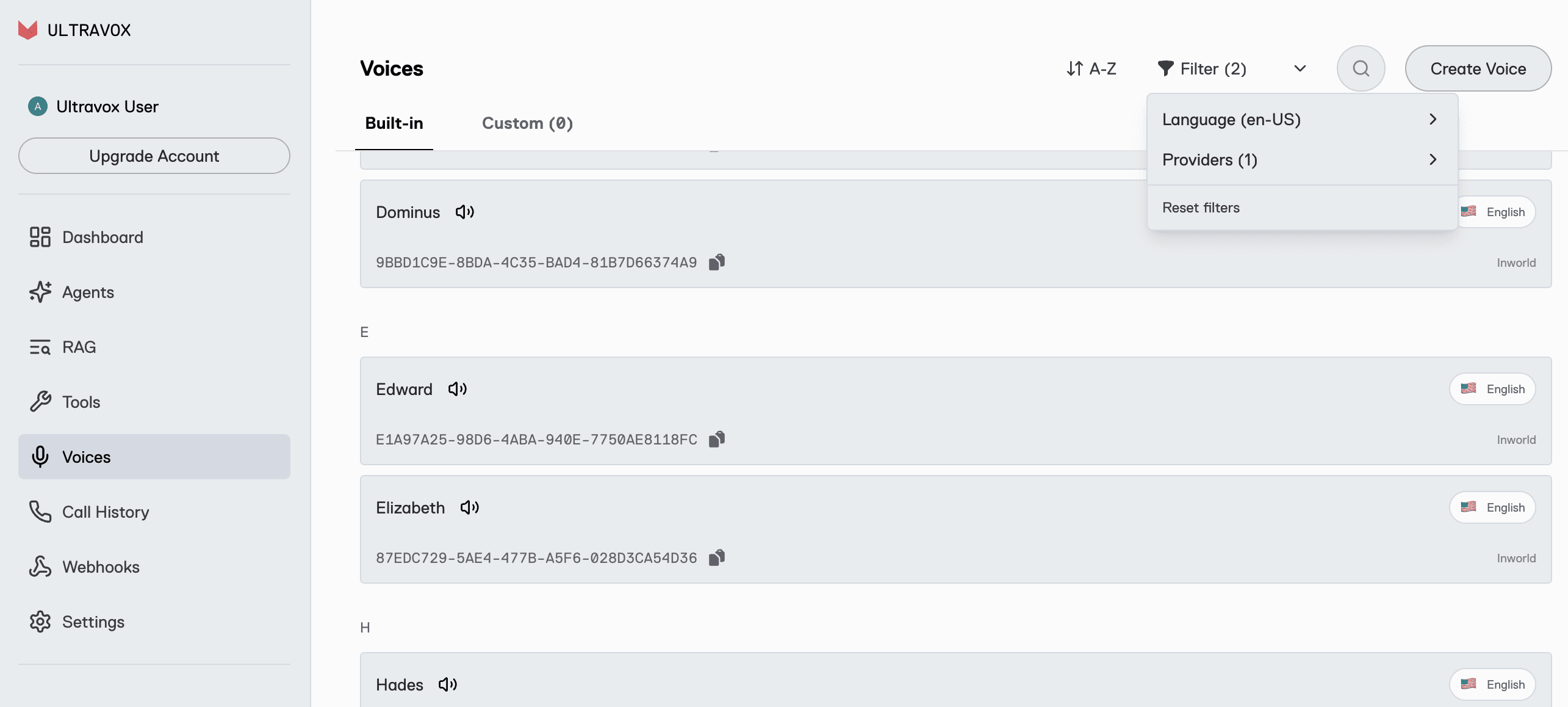
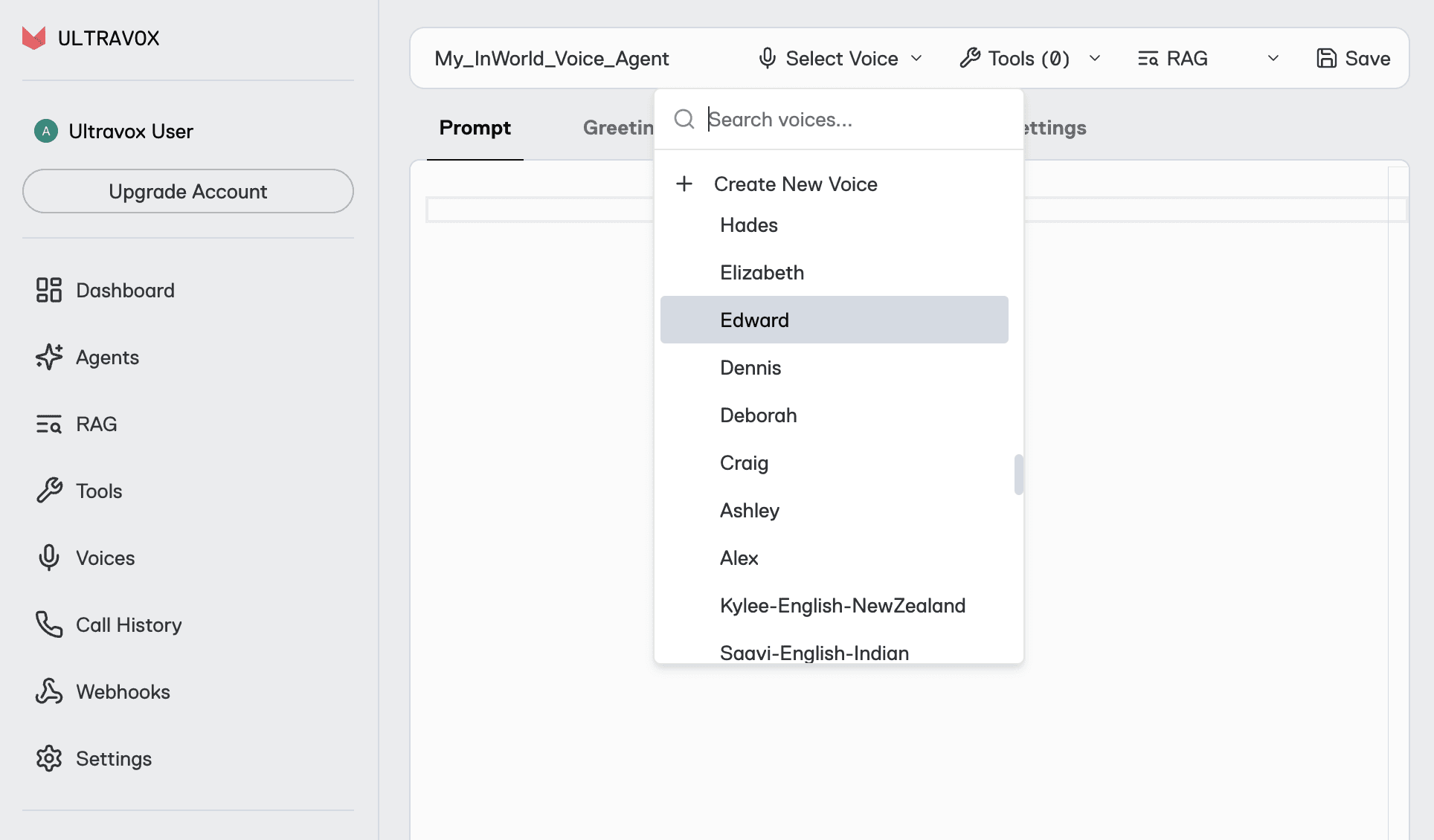
Once you’ve settled on a voice you like, you can either add it to an existing agent or create a new agent and select your preferred voice in the Agents screen.
Earn up to $100 in Ultravox Credits
To celebrate the launch of Inworld TTS 1.5, we’re giving away up to $100 in promotional credits for all our customers who run production voice agents with Inworld voices.
How to qualify
Use Inworld voices for at least 60 call minutes during the promotion period: January 21 - February 28, 2026
Submit the usage survey form before March 13, 2026
Retain (do not delete) any eligible call records before April 1, 2026
For every 60 minutes of call time using Inworld voices during the promotional period, you’ll earn $1.00 in Ultravox account credits – up to $100!
All Ultravox customers (new and existing) on any paid or pay-as-you-go plan are eligible to participate, and there’s no cap on the number of customers who can take part in this promotion.
For more information and FAQ, please visit this page.
In our mission to deliver the best all-around conversational experience, Ultravox trained the world’s most advanced speech understanding model, capable of understanding real-world speech with no text transcription required. And Ultravox outperforms other speech-to-speech models in benchmarks that account for real-world requirements: accurate tool calling, reliable instruction following, and consistent low latency. If you haven’t given Ultravox a try yet, you can create your account here.
Introducing the Ultravox Integration for Pipecat
Ultravox Realtime is now available as a speech-to-speech service in Pipecat. Use the deployment stack you’re used to with a model that accepts no compromise.
If you've built voice agents with Pipecat previously, you've faced a fundamental trade-off.
Speech-to-speech models like GPT Realtime and Gemini Live process audio directly, preserving tone and nuance while delivering fast responses. But when your agent needs to follow complex instructions, call tools reliably, or work with a knowledge base, these models often fall short. You get speed and native audio understanding, but at the cost of reliability.
Cascaded pipelines chain together best-in-class STT, LLM, and TTS services to get the full reasoning power of models like Claude Sonnet or GPT-5. But every hop adds latency, and the transcription step loses the richness of spoken language. You get better model intelligence, but sacrifice speed and naturalness.
Ultravox changes the equation
Like other speech-to-speech models, the Ultravox model is trained to understand audio natively, meaning incoming signal doesn’t have to be transcribed to text for inference. But unlike other models, Ultravox can match or exceed the intelligence of cascaded pipelines, meaning you no longer need to choose between conversational experience and model intelligence.
You don’t need to take our word for it–in an independent benchmark built by the Pipecat team, Ultravox v0.7 outperformed every other speech-to-speech model tested:
Metric | Ultravox v0.7 | GPT Realtime | Gemini Live |
|---|---|---|---|
Overall accuracy | 97.7% | 86.7% | 86.0% |
Tool use success (out of 300) | 293 | 271 | 258 |
Instruction following (out of 300) | 294 | 260 | 261 |
Knowledge grounding (out of 300) | 298 | 300 | 293 |
Turn reliability (out of 300) | 300 | 296 | 278 |
Median response latency | 0.864s | 1.536s | 2.624s |
Max response latency | 1.888s | 4.672s | 30s |
The benchmark reflects real-world conditions and needs, evaluating model performance in multi-turn conversations and considering tool use, instruction following, and knowledge retrieval. These results placed Ultravox ahead of GPT Realtime, Gemini Live, Nova Sonic, and Grok Realtime in head-to-head comparisons using identical test scenarios. Ultravox’s accuracy is on par with traditional text-only models like GPT-5 and Claude Sonnet 4.5, despite returning audio faster than those text models can produce text responses (which, for voice-based use cases, would still require a TTS step to produce audio output).
What this means for your Pipecat application
If you're using a speech-to-speech model today, switching to Ultravox will give you significantly better accuracy on complex tasks (tool calls that actually work, instructions that stick across turns, knowledge retrieval you can rely on) without giving up the low latency and native speech understanding you need.
If you're using a cascaded pipeline, you can switch to Ultravox and unlock the benefits of direct speech processing (faster responses, no lossy transcription, preserved vocal nuance) without sacrificing intelligence.
In either case, our new integration is designed to slot into your existing Pipecat application with minimal friction.
For users with existing speech-to-speech pipelines, the new Ultravox integration should work as a drop-in replacement.
For applications currently built using cascaded pipelines, you’ll replace your current STT, LLM, and TTS services with a single Ultravox service that handles the complete speech-to-speech flow.
Get started today
If you're already running voice agents in production, this is the upgrade path you've been waiting for. If you're just getting started with voice AI, there's never been a better time to build.
Check out this example to see how Ultravox works in Pipecat, then visit https://app.ultravox.ai to create an account and get your API key–no credit card required.

Thank You for an Incredible 2025
As 2025 winds down, we wanted to say, "thank you." Thank you for building with Ultravox, for pushing us to be better, and for being part of what has been, frankly, a mind-blowing year.
2025 by the Numbers
When we look back at where we started at the beginning of the year, the growth is hard to believe:
18x → How much larger our customer base is now than at the end of last year
38x → How much larger our busiest day was in 2025 vs. 2024
235 → The number of best-ever days on the platform in 2025
None of this happens without you. Every integration you've built, every voice agent you've deployed, every piece of feedback you've shared - it all adds up. You're not just using Ultravox, you're shaping it.
What's New
Before the holiday break, we wanted to get a few things into the hands of our users:
React Native SDK
Many of you asked for it, and it's here. Build native mobile voice experiences with Ultravox:
Source code and example app available in the repo.
Client SDK Improvement
Based on your feedback, we've made a change to how calls start: calls now begin immediately after you join them. No more waiting for end-user mic permission.
Why this matters: Inactivity messages now work as you'd expect. If an end user never starts speaking, the inactivity timeout can end the call automatically. This keeps those errant calls to a minimum and saves you money.
Call Transfers with SIP
Your agents can now transfer calls to human operators with built-in support:
coldTransfer— Immediately hand the call to a human operator. No context, instant handoff. Docs →warmTransfer— Hand off to a human operator with context about the call, so they're prepped and not going in cold. Docs →
Full guide: SIP Call Transfers →
Here's to What You'll Build Next & A BIG 2026
Voice AI is hitting an inflection point. The technology is finally good enough (fast enough, natural enough, affordable enough) to power experiences that weren't possible even a year ago.
Our 0.7 model release has been benchmarked against every major competitor (Gemini, OpenAI, Amazon Nova) and Ultravox leads in both speed and quality. When you factor in our $0.05/minute pricing, the choice becomes pretty obvious.
Thank you for being a customer. Thank you for believing in what we're building. And thank you for an unforgettable year. We have been hard at work on some new capabilities we can’t wait to get in your hands! Stay tuned for lots more to come in 2026!
Happy holidays from all of us at Ultravox.